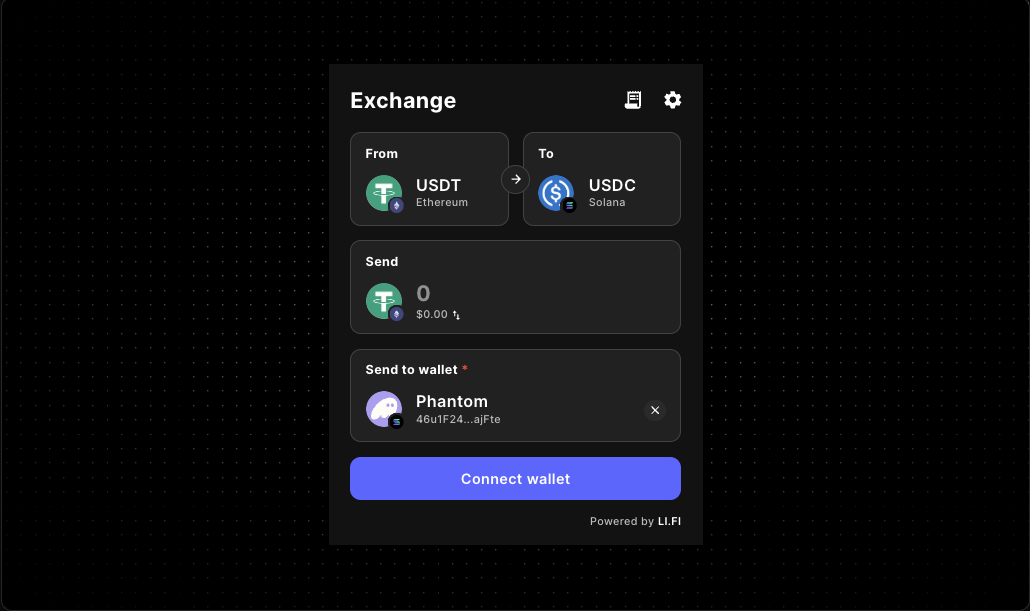
LI.FI Widget Embedded Wallet Routing Guide
Embedded wallets change more than the connection step. They change when a LI.FI widget should ask for wallet access, how much route freedom users can handle, which destination constraints make sense, and what the page needs to explain before the first swap or bridge action.
Use this guide when you are building a wallet-aware embedded experience in React or Next.js and need practical direction before implementation hardens the wrong routing assumptions.
If you need the broader setup overview first, start with the LI.FI Widget docs or the live LI.FI Widget component reference. If your main blocker is wallet onboarding, pair this page with the LI.FI Widget Wallet Connect Guide.
Who this guide helps
- frontend engineers embedding a LI.FI swap or bridge flow inside a wallet-aware product
- product engineers deciding when wallet state should appear relative to route selection
- teams narrowing destination chains or assets so a guided transfer path feels intentional
- builders validating whether the widget is a destination page or one step inside a broader app flow
What this page helps you decide
Connection timing
Decide whether wallet creation or connection should happen before users evaluate routes, during the widget flow, or inside an already wallet-aware shell.
Route scope
Choose whether the page should support broad route exploration or one product-owned transfer path with tighter defaults.
Destination expectations
Confirm which chains, assets, or downstream states are actually supported after the transfer completes.
Post-route handoff
Make the next product step obvious so the route does not end in a dead state after the transaction succeeds.
Container fit
Validate the widget inside the real dashboard, drawer, modal, or onboarding shell instead of a blank demo-only page.
Why embedded wallets change routing decisions
A LI.FI widget on a wallet-first DeFi page can assume users already understand wallet behavior. An embedded wallet flow usually cannot. The app often owns more of the journey: account creation, funding guidance, transaction context, and post-transaction next steps. That means route design has to stay closer to product intent.
- connection happens closer to the task itself
- route scope often needs to stay narrower
- destination constraints matter earlier in the page design
- the page has to explain more before the first action
- support burden rises quickly when routing is too open
That is why embedded-wallet planning should happen before you finalize widget configuration, not after the embed already works in isolation.
The three embedded wallet routing models teams usually choose from
Embedded wallet first, widget second
Best for
- onboarding or account-funding flows
- apps where embedded wallet state is part of activation
- product paths that need a narrower destination outcome
Watch for
- a pre-widget connection step that feels disconnected from the transfer task
- route options that conflict with the product's required destination
- returning-session behavior that forces users through the same wallet step again
Widget first, embedded wallet created in context
Best for
- dedicated swap or bridge pages
- MVP routes where the widget is the primary action surface
- flows where the route itself is the clearest explanation of the task
Watch for
- disconnected states that do not explain why wallet access is required
- broad route choice overwhelming first-time users
- small-screen layouts where connection and route UI compete for space
Embedded wallet already lives in the product shell
Best for
- dashboards, treasury tools, and wallet-aware app shells
- products with existing session state around wallet access
- pages where transfers are one step inside a broader operational workflow
Watch for
- deep links that bypass assumptions about existing wallet state
- chain switching that is technically valid but confusing in product context
- compact containers that make route selection feel cramped
How embedded wallets affect route scope
Choose a broader route when exploration is part of the promise
Broader routing can work when the page is intentionally a flexible transfer surface and the product can support multiple valid outcomes after the transaction.
Narrow the route when the product owns the next step
If users must land on one destination chain, hold one supported asset, or continue through one post-transfer workflow, tighter route scope usually reduces confusion and support load.
Treat embedded wallets as an assumption test
Embedded wallets do not automatically require restrictions, but they make weak route assumptions visible much faster than a generic demo-style setup.
Validate support burden, not just technical validity
A route that works in isolation can still be the wrong route for your product if users arrive with unsupported assets, chains, or next-step expectations.
Destination constraints to define before launch
Destination chain constraints
Restrict destination chains when onboarding, deposits, or internal workflows only make sense on selected networks after the transfer completes.
Destination asset constraints
Restrict assets when the next step depends on them so the widget reflects the real product requirement instead of asking users to infer it.
Product-state constraints
Sometimes the true constraint is the next product state, such as activating an account, unlocking a dashboard, or completing one follow-on action after funding.
Support and trust constraints
If the team cannot comfortably support every technically valid destination outcome, the page should guide users toward the subset that matches the real product promise.
Connection timing shapes the rest of the page
Connect before route selection when
- wallet state is part of account creation or activation
- the product needs wallet context before it can decide what users should see
- route options depend on product-specific session state
- the page should feel like a guided operational step rather than an open-ended explorer
Connect during route selection when
- the widget page itself is the clearest explanation of the action
- the route is a dedicated transfer destination
- users benefit from seeing route context before they connect
- you are proving the narrowest viable flow before adding more opinionated wallet handling
Validate returning-session behavior
- refresh behavior after partial progress
- direct-entry behavior from deep links
- reconnect behavior after expired or incomplete session state
- what the page shows when the app recognizes the user but wallet context is still incomplete
UX checks that matter more with embedded wallets
Pre-transaction clarity
Explain what the route is for, why a wallet is needed, whether routing is intentionally narrow, and what happens after the transfer completes.
Real-container validation
Check the page inside the production container so route selection, wallet UI, and surrounding copy still feel coherent on smaller screens and constrained layouts.
Error and mismatch states
Handle missing funds, unsupported route expectations, destination mismatches, and chain-switch requests with more context than a generic wallet prompt provides.
Post-route handoff
After transfer completion, make the next product step obvious: continue onboarding, confirm funding, return to a dashboard, or begin the next action.
A practical LI.FI playground workflow before production
1. Start with the smallest viable embed
Mount the widget in a client-rendered surface that resembles the real route and confirm the base layout works before shaping routing or wallet behavior.
2. Test connection timing as a variable
Compare no-wallet, already-connected, refreshed, and deep-linked states to see whether friction comes from page logic or from the widget itself.
3. Compare broad and narrow route scope
Try one exploration-friendly configuration and one product-scoped configuration so the tradeoffs become obvious before launch.
4. Re-test destination expectations
Confirm the route actually leads users into the product state the page assumes; if not, narrow the route or improve the surrounding guidance.
5. Continue into the next doc
Once the routing model feels stable, move into the docs page that matches the next open implementation question instead of overloading one page with every concern.
Embedded wallet routing checklist before production
Wallet-state checks
- confirm the page explains why wallet creation or connection is required
- confirm refresh, reconnect, and timeout states feel intentional
- confirm direct entry does not rely on hidden setup assumptions
- confirm the embedded wallet model matches the rest of the product session
Routing checks
- confirm route scope matches the real job of the page
- confirm destination chains are not broader than the product can support next
- confirm destination assets reflect what users actually need after the transfer
- confirm route errors still make sense to first-time users
Page checks
- confirm the widget fits the real production container
- confirm the page stays coherent before and after wallet connection
- confirm chain switching is explained in context when it matters
- confirm the route has a clear next step after completion
Release checks
- confirm adjacent docs point to the right next-step guides
- confirm route restrictions reflect actual product policy, not temporary guesswork
- confirm fee presentation is reviewed separately from routing logic
- confirm broad route claims are avoided when the production path is intentionally narrow
How this page fits the existing Gizmolab LI.FI docs flow
Use this page as the bridge between general widget evaluation and embedded-wallet-specific routing planning. It does not replace the broader docs surface; it helps teams choose how routing should behave before implementation locks those choices in.
- LI.FI Widget docs for the broader setup overview
- LI.FI Widget Wallet Connect Guide for wallet onboarding decisions
- LI.FI Widget Supported Wallets and Routing Guide for broader wallet-support and route-scope framing
- LI.FI Widget Playground Routing Guide for route-testing and page-fit validation
- LI.FI Widget embed guide for practical embedding work
- LiFi Playground Guide for a broader evaluation workflow
- LI.FI Widget component reference for the live component surface
FAQ
Do embedded wallets always mean I should narrow LI.FI widget routes?
No. Embedded wallets do not automatically require narrow routing, but they make it more important to justify route breadth. If the product owns a specific next step, a narrower path is usually easier to support.
Should wallet connection happen before the LI.FI widget loads?
It depends on the route. Connect first when wallet state is part of account setup or product context. Let connection happen in the widget flow when the route page itself is the clearest explanation of the task.
What makes embedded wallet routing different from a general wallet connect flow?
Embedded wallet routing has to account for product-owned constraints like destination expectations, post-transfer state, tighter onboarding copy, and a clearer next-step handoff around the widget experience.
When should I restrict destination chains or assets?
Restrict them when the next step in the product depends on them. If users need to land on one chain or hold one asset to continue, the route should reflect that requirement instead of leaving the page to fix confusion later.
Why is returning-session behavior especially important here?
Embedded wallets usually live inside a larger app journey, so refreshes, deep links, and reconnect states can make the route feel unreliable even when the core widget itself works.
Does this page replace the implementation docs?
No. This page helps you decide how embedded wallets should shape routing behavior. Use the adjacent docs for practical embed setup, wallet-connect planning, and deeper route testing.
Continue with the next step
Use the smallest viable embedded flow to validate connection timing, route scope, and destination expectations before you finalize the production page. Then move into the adjacent implementation surface that matches your next open question.
- Need the broad component setup? Go to the LI.FI Widget docs.
- Need wallet onboarding guidance? Go to the LI.FI Widget Wallet Connect Guide.
- Need broader wallet-support and route-planning context? Go to the LI.FI Widget Supported Wallets and Routing Guide.
- Need route-testing workflow help? Go to the LI.FI Widget Playground Routing Guide.
"One of the only full-stack Web3 component libraries i've seen in the space so far. Ten out of ten recommended. Saved me a ton of time. Can't wait to see what templates they release next."
Samy
Side projects builder