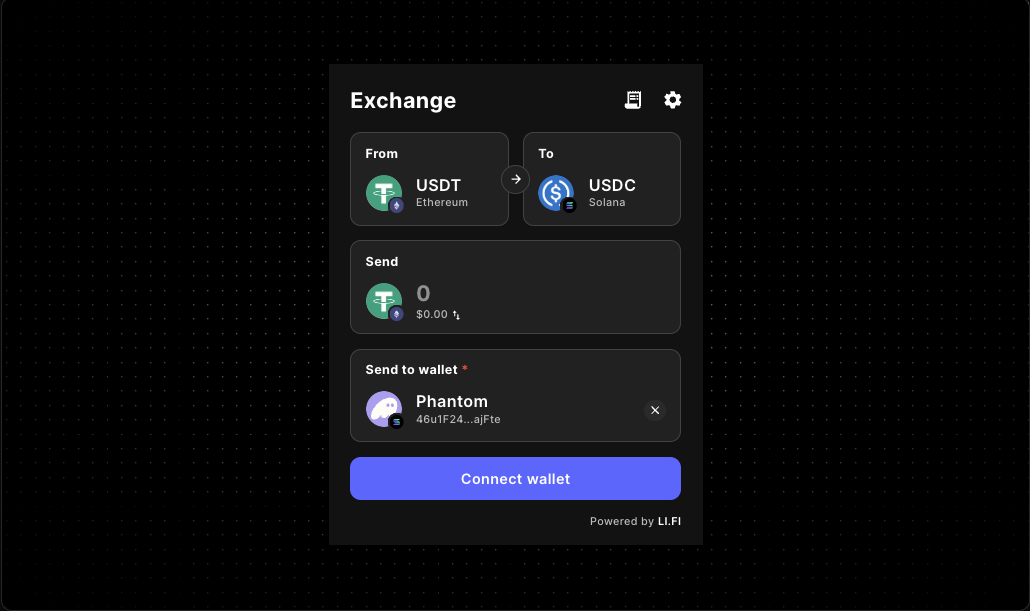
LI.FI Widget Route Preview Guide
Plan a pre-transaction route visibility layer before users commit to a cross-chain swap or bridge. This guide helps builders explain destination expectations, estimated outcomes, fee tradeoffs, and what happens next inside a production-minded LI.FI widget flow.
Who this guide helps
- frontend engineers embedding the LI.FI widget inside a React or Next.js app
- product teams that need pre-transaction route visibility before a swap or bridge starts
- builders shaping onboarding, funding, treasury, or checkout-style cross-chain flows
A LI.FI widget can render a valid route and still leave users uncertain about what they are about to receive. A route preview layer helps teams show the destination chain, expected token outcome, estimated timing, visible fees, and route tradeoffs before the user signs.
That matters most when the transfer is part of a larger product job. If users need to fund an account, arrive on a specific chain, continue onboarding, or understand why one route is being shown over another, route visibility becomes part of the product experience rather than a nice extra.
If you are still deciding how to embed the widget, start with the LI.FI Widget docs and the live LI.FI Widget component reference. If the main question is wallet timing, continue with the LI.FI Widget Wallet Connect Guide. If you want to compare broader route-scope experiments first, review the LI.FI Widget Playground Routing Guide.
Why route preview deserves its own UX pass
Destination expectations
Users should understand which chain they will land on, which token they are likely to receive, and whether the route keeps the same asset or ends in a different one.
Estimated outcome
The preview should show what the route is expected to deliver while clearly framing timing and output as estimates rather than guarantees.
Fee and tradeoff framing
The goal is not to expose every routing detail. It is to make the main cost, speed, or simplicity tradeoffs legible before the transaction starts.
Next-step clarity
A route preview works best when the page explains what the transfer unlocks next, such as onboarding, funding, checkout, or a guided product step.
What a useful route preview should make obvious
A route preview should improve comprehension, not overwhelm users with raw routing detail. The most effective previews answer four questions quickly:
- Which chain will I end up on?
- Which token should I expect to receive?
- What is estimated versus fixed?
- What happens after the transfer completes?
Common route-preview patterns for LI.FI widget flows
Inline summary above the primary action
Use a short route summary when the page only needs a quick confidence layer before the widget becomes the main focus.
- destination chain and token
- estimated receive amount
- short fee or route note
- what happens after completion
Expandable route details inside the widget area
Use this pattern when builders want transparency without leading with too much complexity.
- plain-language route steps
- expected chain transitions
- timing or complexity notes
- transaction-state expectations before submission
Preview panel beside a wider layout
A side-by-side layout works well when the route is the page’s main job and there is room to separate action controls from route understanding.
- supporting context for destination expectations
- room for tradeoff framing
- clear separation between form controls and explanation
- space for related documentation links
Guided preview inside checkout or onboarding
Keep the preview intentionally narrow when the route is one step inside a larger product flow.
- what the user sends
- what they should expect to receive
- where assets will arrive
- what the next product step is
Example: pair the widget with a preview summary
A side-by-side layout is often enough to test whether the route needs an explicit preview before submission. Start simple, then add more detail only if the flow actually needs it.
A practical workflow for shaping route preview UX
- render the widget in the real page container before designing extra preview behavior
- define the exact destination chain, token, and post-transfer expectation the product needs to make clear
- test the smallest useful preview before adding more detail
- label estimates carefully whenever the final route can differ from the preview
- keep fee and tradeoff language proportional to the job of the page
- compare broader route exploration against narrower onboarding or checkout flows before hardening the implementation
Common mistakes in route-preview design
Showing too little context
If users cannot tell where assets will arrive or what they are likely to receive, the preview does not do its job.
Showing too much low-level detail too early
A route preview should improve confidence, not force users to parse a routing engine before they can continue.
Treating estimates like guarantees
Estimated outputs, timing, and route conditions should be framed carefully so the page stays honest and implementation-safe.
Designing the preview separately from the host flow
Onboarding, checkout, embedded dashboards, and dedicated bridge routes need different levels of explanation. The surrounding product context matters.
Where this guide fits in the LI.FI docs flow
Use this page as the pre-transaction decision layer for route visibility UX.
- Go to the LI.FI Widget docs for baseline integration context.
- Go to the LI.FI Widget Wallet Connect Guide when connection timing affects route understanding.
- Go to the LI.FI Widget Playground Routing Guide when you need to compare broader routing behavior before narrowing it.
- Go to the LI.FI Widget Checkout Routing Guide when the route is one step inside a guided funding or onboarding flow.
FAQ
What is a LI.FI widget route preview?
A LI.FI widget route preview is the pre-transaction layer that helps users understand where a route ends, what they are likely to receive, and which tradeoffs they are accepting before they submit a swap or bridge.
Why add a route preview if the widget already renders the route?
Because a technically valid route is not always self-explanatory. Many products need clearer destination, estimate, and next-step framing before users commit to the transfer.
What should a cross-chain route preview show first?
Start with destination chain, destination token, estimated receive amount, and any route context that changes user confidence or the next product step.
Is route preview the same as checkout routing?
Not exactly. Route preview focuses on what the user understands before submitting the transaction. Checkout routing focuses more broadly on how the route fits inside a guided product flow.
Does route preview replace the main LI.FI widget integration docs?
No. This guide focuses on pre-transaction route visibility UX. The main LI.FI widget docs still matter for integration setup, and adjacent guides help with wallet timing, playground evaluation, and checkout behavior.
Should every LI.FI widget integration have a large route-preview panel?
No. Some flows only need a light inline summary, while others benefit from a more explicit preview because the route is part of onboarding, funding, treasury, or a narrower checkout path.
"One of the only full-stack Web3 component libraries i've seen in the space so far. Ten out of ten recommended. Saved me a ton of time. Can't wait to see what templates they release next."
Samy
Side projects builder